Update and rollback #
The application version and the dictionary versions are tied together: a new version of the services may not work with old dictionaries. Therefore the application and the dictionaries are updated together, within a single maintenance window.
The exact versions of the required dictionaries are indicated in the block Requirements for versions of dictionaries on the page
changelog
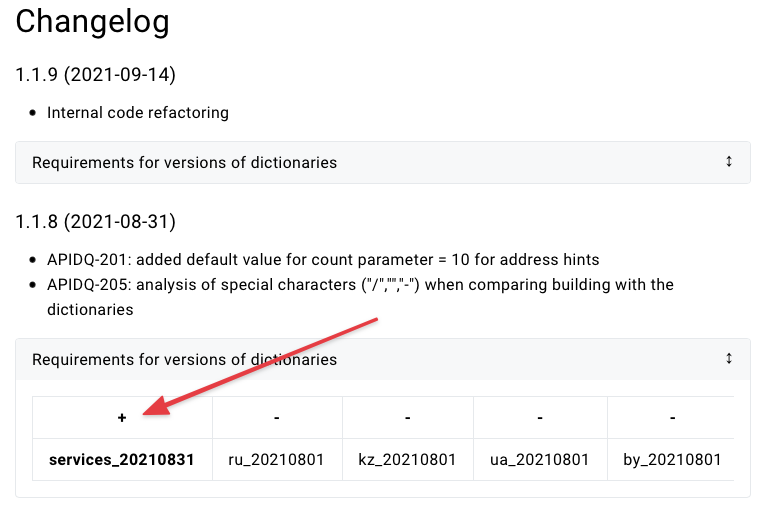
If the dictionary is in bold and there is a plus sign above it, it means that the dictionary has been updated for this version, otherwise the dictionary update is not required.
If you skipped several versions, check the block Requirements for versions of dictionaries of every skipped version - a dictionary may have been updated in one of them.Update procedure #
- Preparation - download dictionaries and images. The application keeps running.
- Stop the application
- Database update - only if dictionaries are updated for the version
- Start and check the application
- Database cache warm-up
The service is unavailable from step 2 to step 4. Without a dictionary update this takes about a minute, with an update of the ru dictionary - up to an hour and a half.
If ApiDQ is installed on several servers behind a load balancer, update the servers one at a time: take the server out of rotation, update it, wait for a successful check and only then move on to the next one. Use GET /health as the server health check in the load balancer.Preparation #
All actions of this step are performed while the application is running.
Download the updated dictionaries into the ~/apidq/dumps folder on the database server and check that the files are complete and not corrupted. The command reads the whole archive (several minutes for the ru dictionary) and does not change anything in the database:
cd ~/apidq/dumps
pg_restore -f /dev/null services_20241030.dump && echo OK
pg_restore -f /dev/null ru_20260907.dump && echo OK
Do not drop the old dictionary from the database until the new one is downloaded and has passed the check.
On the application server, in folder apidq, set the new version in the .env file
APIDQ_VERSION=1.22.0
and pull the images
docker compose pull
If the images in yourdocker-compose.yamluse thelatesttag, replace it with${APIDQ_VERSION}- the current file is given in Install ApiDQ application. When updating, also compare your service configuration files with that instruction.
Stop the application #
docker compose stop
The address service loads dictionaries into memory on startup, so the application must be stopped while the database is being updated. If dictionaries are not updated, go to the step
Start and check the application.
Database update #
Temporary PostgreSQL parameters #
For the duration of the restore we recommend setting temporary PostgreSQL parameters - they speed up the restore and keep autovacuum from competing with it.
Create file /etc/postgresql/18/main/conf.d/zz-apidq-restore-window.conf
max_wal_size = 4GB
maintenance_work_mem = 256MB
autovacuum = off
and apply it
sudo systemctl reload postgresql@18-main
maintenance_work_memis allocated per restore job. Check the memory budget:shared_buffers+ number of-jjobs ×maintenance_work_mem+ 1.5 GB must not exceed the server RAM.
Restore dictionaries #
For each updated dictionary you need to drop old SCHEMA and restore new SCHEMA from dump (example for services and ru). The -j parameter is the number of parallel jobs, specify the number of server CPUs.
Restore dictionaries one at a time: run the commands for one dictionary, make sure they completed without errors, and only then move on to the next one.
cd ~/apidq/dumps
export PGPASSWORD='p_a_s_s_w_o_r_d'
psql -v ON_ERROR_STOP=1 -U user_apidq -h 127.0.0.1 -d db_apidq -c "DROP SCHEMA IF EXISTS services CASCADE;" && \
pg_restore --no-owner --no-acl -Fc -j 8 -U user_apidq -h 127.0.0.1 -d db_apidq services_20241030.dump && echo OK
psql -v ON_ERROR_STOP=1 -U user_apidq -h 127.0.0.1 -d db_apidq -c "DROP SCHEMA IF EXISTS ru CASCADE;" && \
pg_restore --no-owner --no-acl -Fc -j 8 -U user_apidq -h 127.0.0.1 -d db_apidq ru_20260907.dump && echo OK
The
namedictionary is restored into thepublicschema, which also holds PostgreSQL extensions (postgis,hstore,pg_trgm,uuid-ossp). Never runDROP SCHEMA public. To update thenamedictionary use the--clean --if-existsparameters -pg_restoreitself drops only the objects contained in the dump:pg_restore --clean --if-exists --no-owner --no-acl -Fc -U user_apidq -h 127.0.0.1 -d db_apidq name_20210801.dump && echo OKAfter that add
--schema=publicto the statistics command below.
Collect statistics #
This step is mandatory. pg_restore does not transfer planner statistics: without it the very first queries to the new dictionary run as full table scans and can fully load the server CPU and memory.Run VACUUM ANALYZE for all restored schemas before starting the application:
vacuumdb --analyze --jobs=8 -U user_apidq -h 127.0.0.1 -d db_apidq --schema=services --schema=ru
Revert PostgreSQL parameters #
Remove the temporary file and apply the settings. Perform this step even if the restore failed or the session was interrupted - otherwise autovacuum stays disabled. If you are not sure whether the step was performed, check that the zz-apidq-restore-window.conf file is absent from the /etc/postgresql/18/main/conf.d/ directory.
sudo rm /etc/postgresql/18/main/conf.d/zz-apidq-restore-window.conf
sudo systemctl reload postgresql@18-main
Start and check the application #
docker compose up -d --remove-orphans
The command completes after the address service has loaded the dictionaries into memory (about a minute).
Check the version and the main services. The -w parameter prints the HTTP code after the response: each request must end with the line HTTP 200 and return a non-empty result.
curl -w '\nHTTP %{http_code}\n' 'http://127.0.0.1:8080/api/v1/version'

curl -w '\nHTTP %{http_code}\n' --request POST 'http://127.0.0.1:8080/api/v1/suggest/address' \
--header 'Content-Type: application/json' \
--data-raw '{"query": "москва лазо","countryCode": "RU","count": 2}'

curl -w '\nHTTP %{http_code}\n' --request POST 'http://127.0.0.1:8080/api/v1/clean/address' \
--header 'Content-Type: application/json' \
--data-raw '{"query": "Москва Кравченко 12","countryCode": "RU"}'

curl -w '\nHTTP %{http_code}\n' --request POST 'http://127.0.0.1:8080/api/v1/idsearch/address' \
--header 'Content-Type: application/json' \
--data-raw '{"query": "0c5b2444-70a0-4932-980c-b4dc0d3f02b5","type": "FIAS","countryCode": "RU"}'
Check all three services, not onlysuggest/address: they read different tables of the dictionary. If the application version is newer than the dictionary,suggest/addressmay respond successfully whileclean/addressandidsearch/addressreturn error500.
Database cache warm-up #
After a dictionary restore or a PostgreSQL restart the database cache is empty, and for the first minutes queries run several times slower. We recommend warming up the most used tables and indexes of the address dictionary (example for ru)
sudo su postgres
psql db_apidq -c "CREATE EXTENSION IF NOT EXISTS pg_prewarm;"
psql db_apidq -c "SELECT pg_prewarm('ru.pk_ru_addresses_id');"
psql db_apidq -c "SELECT pg_prewarm('ru.pk_ru_houses_id');"
psql db_apidq -c "SELECT pg_prewarm('ru.idx_ru_houses_address_cover');"
psql db_apidq -c "SELECT pg_prewarm('ru.address_fts');"
psql db_apidq -c "SELECT pg_prewarm(indexrelid) FROM pg_index WHERE indrelid = 'ru.address_fts'::regclass;"
exit
The ru.address_fts table is warmed up last: when shared_buffers is not enough, the data loaded first is evicted, and this table is used most often.
Theru.idx_ru_houses_address_coverindex was introduced in theru_20260907dictionary. For earlier dictionaries skip this command.
Rollback #
Returning to the previous version follows the same order as an update: the database first, then the application. If dictionaries were updated together with the version, the previous application version needs the previous dictionary versions - they are indicated in the block Requirements for versions of dictionaries of the required version on the page
changelog
Do not start the previous application version on the new dictionaries: until the database is rolled back the services may return error 500.- Preparation -
download and check the previous dictionary versions (if they were updated), set the previous version in the
.envfile, for exampleAPIDQ_VERSION=1.21.3, and rundocker compose pull - Stop the application
- Database update - restore the previous dictionary versions. If dictionaries were not updated, skip this step
- Start and check the application
- Database cache warm-up
When rolling back to a version below 1.21.1 remove thehealthcheckblock of theaddressservice fromdocker-compose.yamland replace theservice_healthycondition ofgatewaywithservice_started- see Install ApiDQ application.